How do I join Solaris Air VA?
Solaris Air operates using the Newsky network. To sign up just head over to https://newsky.app and create an account. You automatically be enrolled in the Newsky Academy Airline. Download their Newsky ACARS app and complete at least a 1-hour flight in the academy. You must score a 7.00+ on your rating. You will then be eligible to apply to Solaris Air. Find our VA in the Search for Airlines list and click the Join button. Don’t forget you must sign up using a realistic name or your real name (preferred). If you aren’t comfortable with using your real name, please use a realistic pilot name. DO NOT use a celebrity name or the name of any famous person throughout history.
What simulator can I use for your VA?
Newsky supports Microsoft Flight Simulator 2020 & 2024 as well as X-Plane 11 and 12. No additional software is needed.
How active do I need to be in order to stay in the VA?
Once you sign up and are accepted into the VA you need to fly your first flight within 14 days. After that we expect every pilot to fly at least one flight per month. If you cannot abide by this simple requirement you shouldn’t be signing up for any virtual airline really. This is a pretty standard requirement across most VA’s.
Can I pause the simulator?
Yes. If you have to step away from the PC you can pause for up to 45 minutes. If you have not resumed the flight after 45 minutes though Newsky will assume you have crashed to desktop and/or no longer plan to complete the flight so keep that in mind.
Can I use time acceleration on a flight?
No. Time acceleration is not allowed. If you want to fly the long haul better be sure your computer is up to the task of running for 6+ hours. 🙂
Can I substitute this airframe for that airframe?
No. Please use the proper aircraft for the flight. If the flight calls for a Boeing 767-300 then please use the 300 and not the 200 for example. Every aircraft in our Newsky fleet is fully defined with what Sim company and configuration is expected. You CAN sub if it’s a different plane maker. For example, if the plane says it is for the PMDG 738 CFMs you can load the ZIBO 738 on X-Plane 12 for example and it should still be detected as the right plane but make EXTRA sure your ZFW’s match.
I crashed a plane... What do I do now?
File an NTSB report through Discord in the #NTSB channel. We need to know what happened. Was it a glitch? Did a certain plane screw up? Do you need more practice? Did you fall asleep on the couch? These reports help us send out NOTAMS about the performance of certain aircraft and other software in the simulation environment. Until we receive an NTSB report from you your flight status will be marked as Suspended which means you can’t fly another plane. Repeated crashes of aircraft will get you terminated from service with the airline.
I won't be able to fly for a while. What do I do?
Request a Leave of Absence by messaging an officer either through Newsky messaging or Discord. LOA’s are only good for 3 Months (90 days). If you aren’t back by then Newsky will auto kick you.
The plane I fly doesn't have a Solaris livery. Can we have one?
Yes provided a livery painter is available. We have many different aircraft in our fleet and it is our intention to have a Solaris livery for each and every one on both X-Plane
and MSFS2020/2024. Just let us know in the #Requests channel on Discord what you are looking for and we’ll put it on the TODO list.
We need xxx Aircraft in our fleet! Can we have one?
All requests for an airframe addition should be made in the Requests channel on Discord. If there is a good simulation of it available on MSFS2020/2024 or X-Plane 11/12 and at least three pilots are interested in the aircraft, we will add it.
I want to fly from xxxx to xxxx but there are no routes! Can we have some?
We are only allotted 1000 routes on the Newsky network which we have already used up to cover our US domestic schedule. If we don’t have a route you want feel free to utilize the Free Form flight system and make your own flight route.
When are pilot promotions given out?
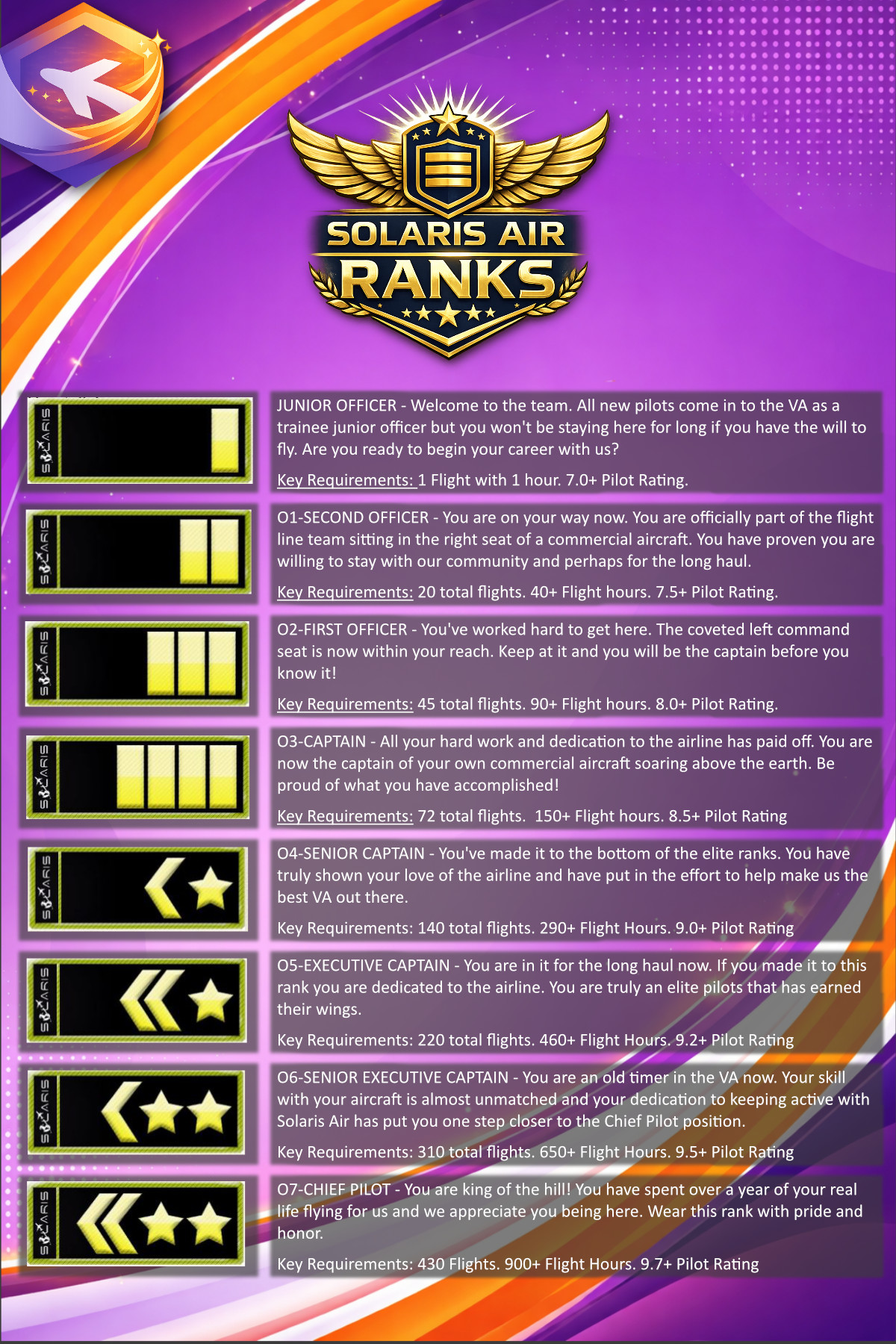
When you tell us. It is the pilot’s responsibility to use the Discord #requests channel to inform an officer you’re ready for review for promotion. An officer will review your records for the correct number of flights, flight hours and pilot rating and take appropriate action.
How do I get promoted?
Your promotion is based upon the number of flights, flight hours and your pilot rating. Once you match all the requirements put in a promotion review request in the #requests channel on Discord.